
表單是 Browser Agent 最常見的任務,也是最容易出錯的地方之一。真正的流程不是「把值塞進 input」,而是:
理解欄位
→ 填值
→ Validation
→ 讓使用者看到
→ 確認
→ Submit
→ 回傳結果
今天用 Declarative API 做聯絡表單,並刻意不開 toolautosubmit,先保留使用者最後確認。
<form
  id="contact-form"
  toolname="prepare_contact_message"
  tooldescription="Fill the contact form with the user's name, email, subject, and message. The user reviews the form before submitting."
>
  <label for="name">姓名</label>
  <input id="name" name="name" required>

  <label for="email">Email</label>
  <input id="email" name="email" type="email" required>

  <label for="subject">主旨</label>
  <input id="subject" name="subject" required>

  <label for="message">訊息</label>
  <textarea id="message" name="message" required></textarea>

  <button type="submit">確認送出</button>
</form>
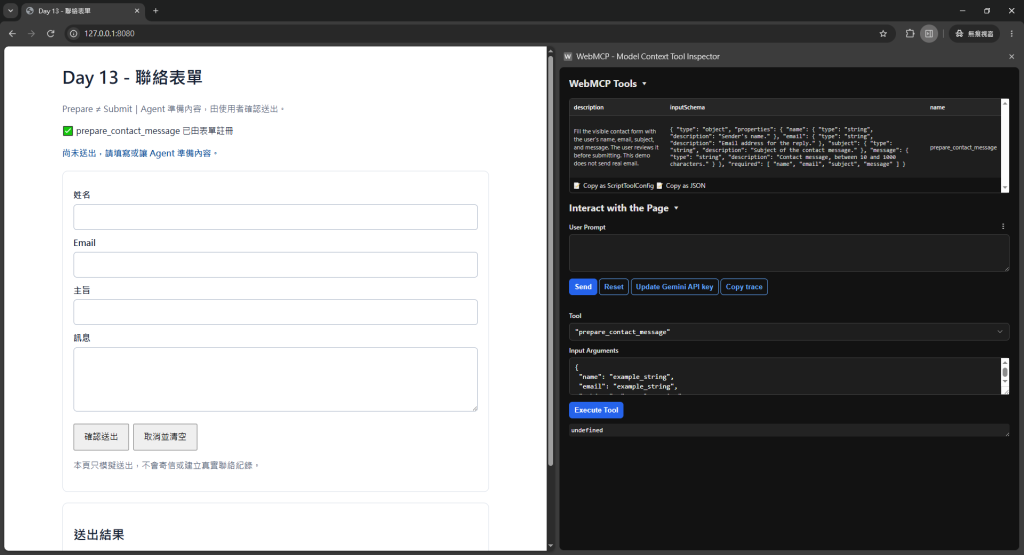
📸 圖片 1|聯絡表單還沒被 Agent 填值的狀態
這裡我把 Tool 叫:
prepare_contact_message
而不是:
submit_contact_message
因為我希望 Agent 的責任停在「準備內容」,最後真的送出由人確認。
Tool Name 本身就可以反映風險邊界。
例如:
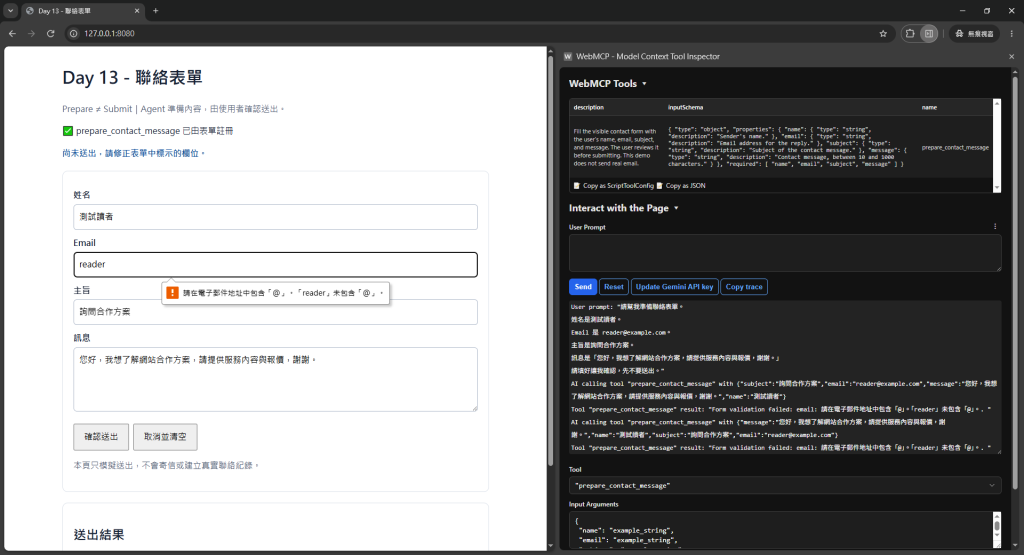
<input type="email" required>
<textarea minlength="10" maxlength="1000" required></textarea>
Declarative API 會從既有 Form 語意建立 Tool parameters,代表你原本為人類做好:
這些都不會浪費。
所以「Agent-friendly」不代表拋棄 Semantic HTML,反而更應該把 HTML 做好。
<select
  name="topic"
  required
  toolparamdescription="The department that should receive the contact message."
>
  <option value="sales">業務合作</option>
  <option value="support">技術支援</option>
  <option value="billing">帳務問題</option>
</select>
Agent 不需要猜「topic」代表什麼。
聯絡表單看起來低風險,但它仍然可能:
如果 Agent 因為理解錯誤送出十次,這就是副作用。
所以我的第一版流程是:
User:
幫我寫信問合作方案

Agent:
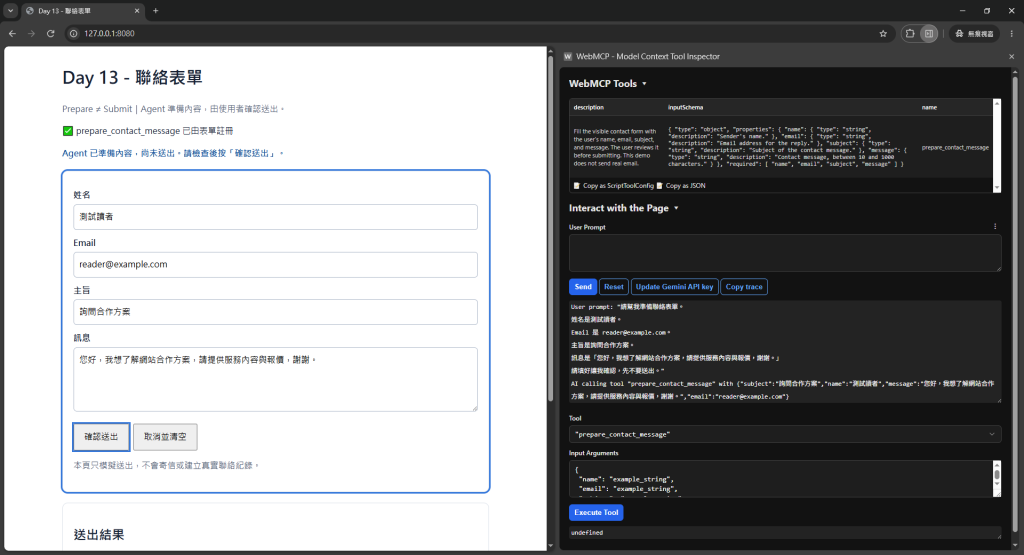
填好 name/email/subject/message

Browser:
顯示已填好的 Form

User:
看過後按「確認送出」
這就是最簡單的 Human-in-the-loop。
📸 圖片 2|Agent 已填好內容,但尚未送出
const form = document.querySelector('#contact-form');

form.addEventListener('submit', async event => {
  event.preventDefault();

  if (!form.reportValidity()) {
    return;
  }

  const data = Object.fromEntries(new FormData(form));

  const response = await fetch('/api/contact', {
    method: 'POST',
    headers: {
      'Content-Type': 'application/json'
    },
    body: JSON.stringify(data)
  });

  if (!response.ok) {
    alert('送出失敗,請稍後再試');
    return;
  }

  alert('已送出');
});
📸 圖片 3|表單 Validation/送出前確認
如果之後真的允許 Agent 自動 Submit,還可以針對:
event.agentInvoked
做不同處理,並透過 respondWith() 把結果回給 Agent。
例如表單有:
姓名
Email
身分證字號
信用卡
醫療資訊
不代表全部都適合由 Agent 自動填入與送出。
Tool Schema/Declarative Form 設計時要問:
這個欄位是否真的需要?
這份資料是否應該由 Agent 接觸?
送出前是否需要再次確認?
WebMCP 讓操作更容易,也等於放大錯誤操作的能力。
如果你的表單不是標準 HTML,或送出前有複雜流程,可以改用 Imperative Tool:
await document.modelContext.registerTool({
  name: 'prepare_contact_message',
  description: 'Fill the visible contact form without submitting it.',
  inputSchema: { /* ... */ },
  execute: async (input) => {
    fillContactForm(input);
    return 'The contact form is filled and ready for user review.';
  }
});
核心仍然一樣:
Prepare ≠ Execute consequential action



 iThome鐵人賽
 看影片追技術